---
title: POS Quick Keys
description: imrchnt knowledge base
---
[Skip to content](https://help.imrchnt.com/s/17626/a/723023-pos-quick-keys#main-content)
English
Show submenu for translations

Open main navigation
Close main navigation
- English
Show submenu for translations
- Contact us
Contact us
How can we help you?
- There are no suggestions because the search field is empty.
1. [imrchnt knowledge base](https://help.imrchnt.com/?hsLang=en)
2. [Legacy imrchnt](https://help.imrchnt.com/legacy-imrchnt?hsLang=en)
# POS Quick Keys
## pos quick keys, pos quickkey, pos function key
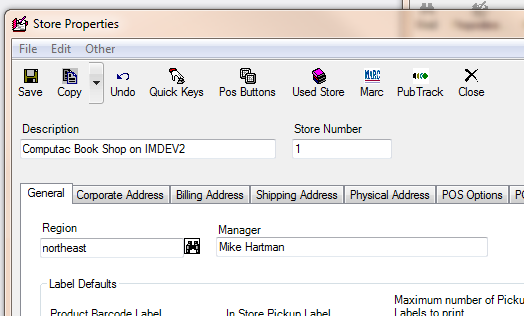
TOOLS \> PARAMETERS
Then click STORE NUMBER
Click on a store and click properties
Then click on the store you want to edit the quick keys for and click PROPERTIES button on the menu above the store details.
Then you will see the QUICK KEYS button, has a hand as the icon. 4th from the left side and also under OTHER drop down menu as first option.
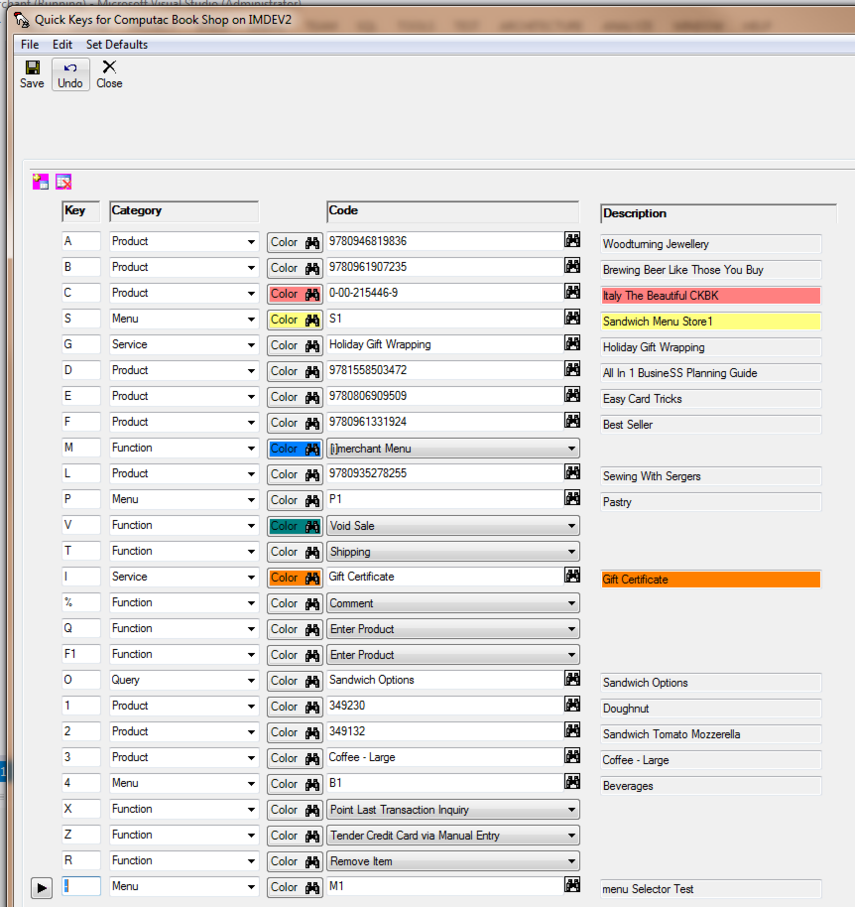
Use the pink box with the PLUS (+) to add a new Quick Key.
You will need to enter the
KEY = Keyboard Key
Category = Product, Menu, Function or Service
Color
Code = Look up related Code
Description = Write a line description for the quick key
Highlight a line and click the icon with the red X to delete the quick key.
[](https://media.screensteps.com/image_assets/assets/003/068/772/original/Quickkeys-1.PNG)
Following is a list of the default shortcut keys you can use while at the POS.
**The iMerchant default keys are:**
F1 = Find Service
F2 = Find Product
F3 = Accounts Receivable
F4 = Refund Lock
F5 = Remove Item from Sale
F6 = Discount
F7 = Simple
F8 = Balance Card
F9 = Credit Card
F10 = Check
F11 = Cash
F12 = Debit Card
**If your store administrator has altered the shortcut keys, you will need to get a modified list.**
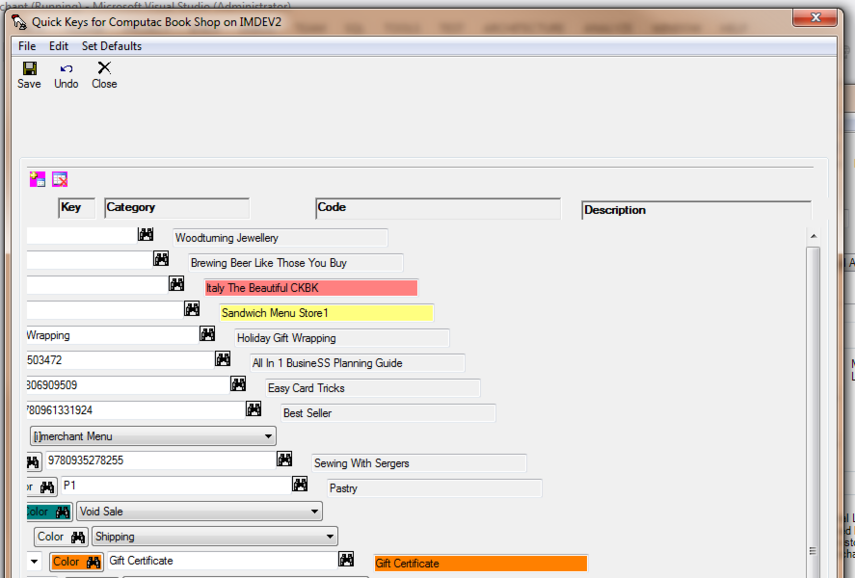
**If you are experiencing an accordion effect (like below) on the list, try expanding the window larger and close and open the quick key menu again.**
[](https://media.screensteps.com/image_assets/assets/003/068/784/original/Quickkeys-2.PNG)
- [FAQs](https://help.imrchnt.com/faqs?hsLang=en#main-content)
- [Reports](https://help.imrchnt.com/faqs?hsLang=en#reports)
- [App](https://help.imrchnt.com/faqs?hsLang=en#app)
- [Getting started](https://help.imrchnt.com/getting-started?hsLang=en#main-content)
- [Store](https://help.imrchnt.com/getting-started?hsLang=en#store)
- [Card Processing](https://help.imrchnt.com/getting-started?hsLang=en#card-processing)
- [Imports](https://help.imrchnt.com/getting-started?hsLang=en#imports)
- [Exports](https://help.imrchnt.com/getting-started?hsLang=en#exports)
- [Troubleshooting](https://help.imrchnt.com/troubleshooting?hsLang=en#main-content)
- [Card Reader](https://help.imrchnt.com/troubleshooting?hsLang=en#card-reader)
- [Web App](https://help.imrchnt.com/troubleshooting?hsLang=en#web-app)
- [General](https://help.imrchnt.com/general?hsLang=en#main-content)
- [Users](https://help.imrchnt.com/general?hsLang=en#users)
- [Point of Sale](https://help.imrchnt.com/general?hsLang=en#point-of-sale)
- [Release Notes](https://help.imrchnt.com/general?hsLang=en#release-notes)
- [Legacy imrchnt](https://help.imrchnt.com/legacy-imrchnt?hsLang=en#main-content)
- [Releases](https://help.imrchnt.com/legacy-imrchnt?hsLang=en#releases)
- [Labels](https://help.imrchnt.com/legacy-imrchnt?hsLang=en#labels)
- [Gift Cards](https://help.imrchnt.com/legacy-imrchnt?hsLang=en#gift-cards)
- [Imports](https://help.imrchnt.com/legacy-imrchnt?hsLang=en#imports)
- [Credit Cards](https://help.imrchnt.com/legacy-imrchnt?hsLang=en#credit-cards)
- [Properties](https://help.imrchnt.com/legacy-imrchnt?hsLang=en#properties)
- [Internal](https://help.imrchnt.com/internal?hsLang=en#main-content)
- [AWS](https://help.imrchnt.com/internal?hsLang=en#aws)
- [iOS](https://help.imrchnt.com/internal?hsLang=en#ios)
- [Card Readers](https://help.imrchnt.com/card-readers?hsLang=en#main-content)
- [Tips](https://help.imrchnt.com/card-readers?hsLang=en#tips)
- [Maintenance](https://help.imrchnt.com/card-readers?hsLang=en#maintenance)
- [Newsletter](https://help.imrchnt.com/newsletter?hsLang=en#main-content)
- [2025](https://help.imrchnt.com/newsletter?hsLang=en#2025)
- [2026](https://help.imrchnt.com/newsletter?hsLang=en#2026)
- [Demo](https://help.imrchnt.com/demo?hsLang=en#main-content)
- [Card Reader](https://help.imrchnt.com/demo?hsLang=en#card-reader)
- [Releases](https://help.imrchnt.com/releases?hsLang=en)
[](https://help.imrchnt.com/?hsLang=en)
[mailto:email@email.com](mailto:email@email.com)
Copyright © 2026, Computac LLC