---
title: Desktop Basics
description: imrchnt knowledge base
---
[Skip to content](https://help.imrchnt.com/s/17626/a/720136-desktop-basics#main-content)
English
Show submenu for translations

Open main navigation
Close main navigation
- English
Show submenu for translations
- Contact us
Contact us
How can we help you?
- There are no suggestions because the search field is empty.
1. [imrchnt knowledge base](https://help.imrchnt.com/?hsLang=en)
2. [Legacy imrchnt](https://help.imrchnt.com/legacy-imrchnt?hsLang=en)
# Desktop Basics
Welcome to iMerchant.
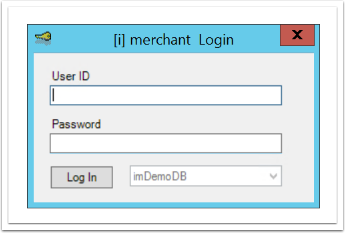
After logging in, the iMerchant Desktop window appears.

This is the iMerchant Launch Point
The top portion of the window with File, Edit, View, etc. will be referred to as the Menu Bar from here on out.
The portion of the window with the buttons for POS, Author, Customer, etc. will be referred to as the Nav Bar from here on out.
The Menu and Nav Bars are your jumping off point for the entire system.
The Menu Bar utilizes pull down menus.
The Nav Bar utilizes buttons, you can choose which buttons are viewable in the Nav Bar by selecting them in the pulldown to the right of the buttons.
The Menu Bar options will function in unique ways depending on the Module you are in.
From the iMerchant Launch Point the Menu Bar will provide you the following options:
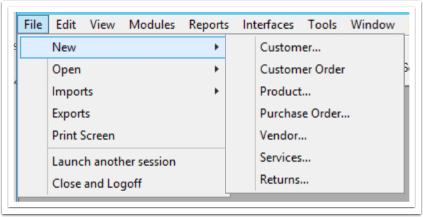
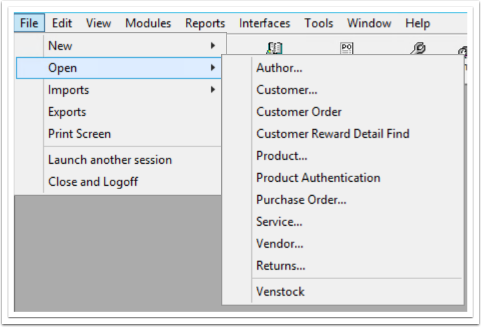
**File:** allows you to print the screen, add something new to the system, access a record that is already on the system, or access an import function, including:
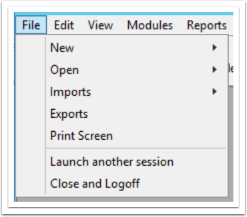
- **New:** Creates a new record for the selected the category
- **Open:** lets youaccess a record that already exists on the system
- **Imports:** To access an import function. From the menu that appears, select the import function you want.
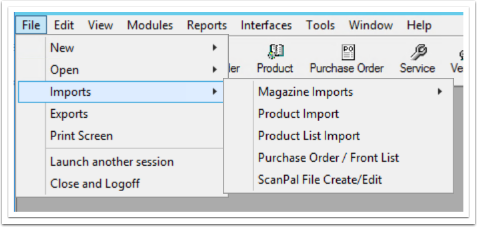
- **Exports:** Allows you to Export files from the system such as Customer, Customer Sales, Customer Orders, Product, Product Sales Summary, Purchase Orders, Receiving, and Returns.
- You can also create your own Export files based on your own criteria
- **Print Screen:** Allows you to print any screen.
**Edit:** not in use from the Launch Point
**View:** not in use from the Launch Point
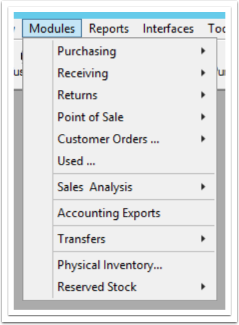
**Modules:** provides access to the various modules
**Reports:** provides quickaccess to the different report templates within the system.
- Reports: shows you all of your reporting options dependent on which module you are
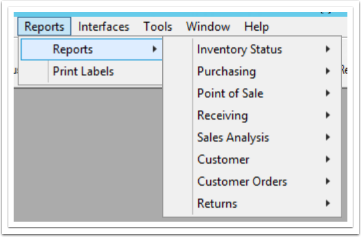
- **Print Labels:** will take you the Print Labels screen
**Interfaces:** accesses the various interface programs that iMerchant works with.
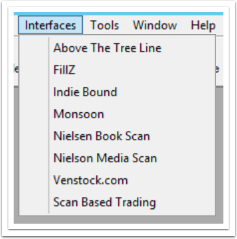
**Tools:** primarily for the system administrator.
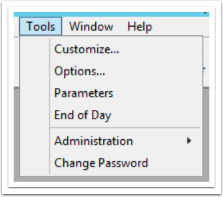
You can learn more about each Tool option by selecting them below:
- [Customize](https://help.imrchnt.com/s/doumentation/l/720140-customize?hsLang=en)
- [Options](https://help.imrchnt.com/s/doumentation/l/722552-options?hsLang=en)
- [Parameters](https://help.imrchnt.com/s/doumentation/l/818272-parameters?hsLang=en)
- [End of Day](https://help.imrchnt.com/s/doumentation/l/722372-end-of-day?hsLang=en)
- [Administration](https://help.imrchnt.com/s/doumentation/l/818277-administration?hsLang=en)
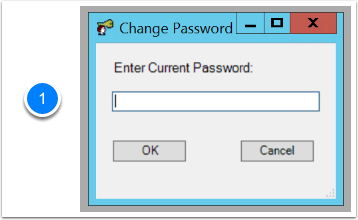
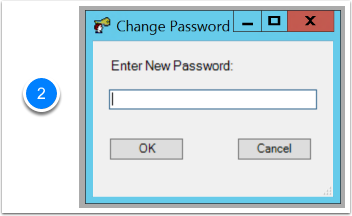
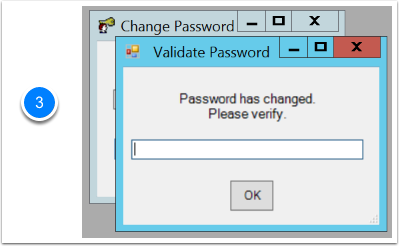
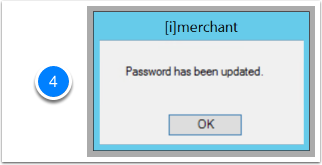
- Change Password:
- Done in 4 steps
**Window:** lists all open iMerchant windows currently in use.
**Help:** provides access to this documentation.
- [FAQs](https://help.imrchnt.com/faqs?hsLang=en#main-content)
- [Reports](https://help.imrchnt.com/faqs?hsLang=en#reports)
- [App](https://help.imrchnt.com/faqs?hsLang=en#app)
- [Getting started](https://help.imrchnt.com/getting-started?hsLang=en#main-content)
- [Store](https://help.imrchnt.com/getting-started?hsLang=en#store)
- [Card Processing](https://help.imrchnt.com/getting-started?hsLang=en#card-processing)
- [Imports](https://help.imrchnt.com/getting-started?hsLang=en#imports)
- [Exports](https://help.imrchnt.com/getting-started?hsLang=en#exports)
- [Troubleshooting](https://help.imrchnt.com/troubleshooting?hsLang=en#main-content)
- [Card Reader](https://help.imrchnt.com/troubleshooting?hsLang=en#card-reader)
- [Web App](https://help.imrchnt.com/troubleshooting?hsLang=en#web-app)
- [General](https://help.imrchnt.com/general?hsLang=en#main-content)
- [Users](https://help.imrchnt.com/general?hsLang=en#users)
- [Point of Sale](https://help.imrchnt.com/general?hsLang=en#point-of-sale)
- [Release Notes](https://help.imrchnt.com/general?hsLang=en#release-notes)
- [Legacy imrchnt](https://help.imrchnt.com/legacy-imrchnt?hsLang=en#main-content)
- [Releases](https://help.imrchnt.com/legacy-imrchnt?hsLang=en#releases)
- [Labels](https://help.imrchnt.com/legacy-imrchnt?hsLang=en#labels)
- [Gift Cards](https://help.imrchnt.com/legacy-imrchnt?hsLang=en#gift-cards)
- [Imports](https://help.imrchnt.com/legacy-imrchnt?hsLang=en#imports)
- [Credit Cards](https://help.imrchnt.com/legacy-imrchnt?hsLang=en#credit-cards)
- [Properties](https://help.imrchnt.com/legacy-imrchnt?hsLang=en#properties)
- [Internal](https://help.imrchnt.com/internal?hsLang=en#main-content)
- [AWS](https://help.imrchnt.com/internal?hsLang=en#aws)
- [iOS](https://help.imrchnt.com/internal?hsLang=en#ios)
- [Card Readers](https://help.imrchnt.com/card-readers?hsLang=en#main-content)
- [Tips](https://help.imrchnt.com/card-readers?hsLang=en#tips)
- [Maintenance](https://help.imrchnt.com/card-readers?hsLang=en#maintenance)
- [Newsletter](https://help.imrchnt.com/newsletter?hsLang=en#main-content)
- [2025](https://help.imrchnt.com/newsletter?hsLang=en#2025)
- [2026](https://help.imrchnt.com/newsletter?hsLang=en#2026)
- [Demo](https://help.imrchnt.com/demo?hsLang=en#main-content)
- [Card Reader](https://help.imrchnt.com/demo?hsLang=en#card-reader)
- [Releases](https://help.imrchnt.com/releases?hsLang=en)
[](https://help.imrchnt.com/?hsLang=en)
[mailto:email@email.com](mailto:email@email.com)
Copyright © 2026, Computac LLC