---
title: Release Update 25.03.03 DB Version 205
description: imrchnt knowledge base
---
[Skip to content](https://help.imrchnt.com/s/17626/a/1923406-release-update-25-03-03-db-version-205#main-content)
English
Show submenu for translations

Open main navigation
Close main navigation
- English
Show submenu for translations
- Contact us
Contact us
How can we help you?
- There are no suggestions because the search field is empty.
1. [imrchnt knowledge base](https://help.imrchnt.com/?hsLang=en)
2. [Legacy imrchnt](https://help.imrchnt.com/legacy-imrchnt?hsLang=en)
# Release Update 25.03.03 DB Version 205
**------------ Release Update 25.03.03 DB Version 205 ---------- Updated: 03/03/25**
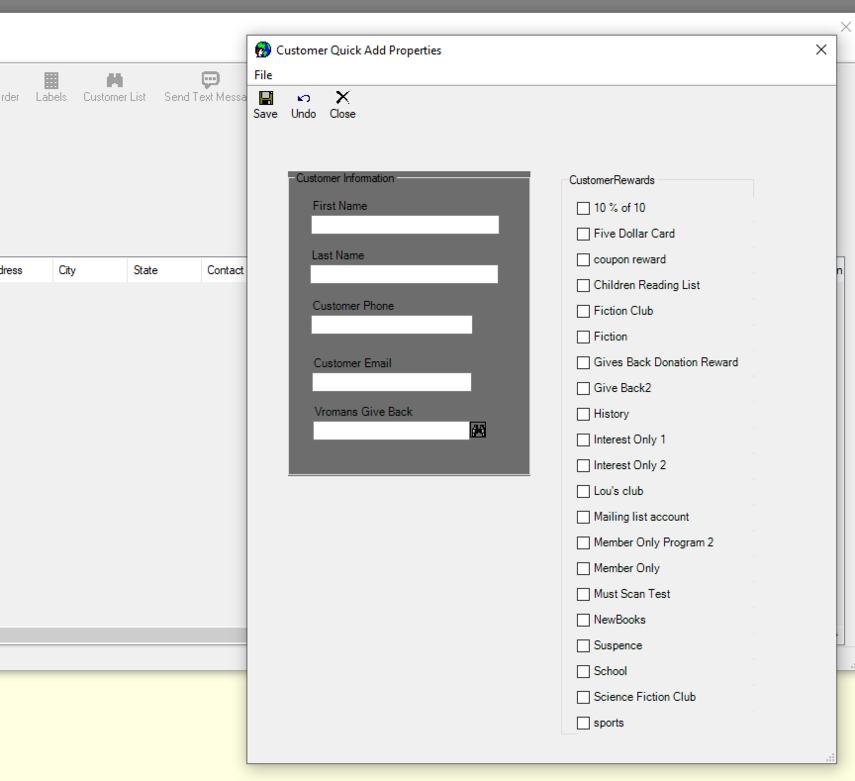
**Customer Quick Add Option Added to POS Find Customer**
- New button added to Find Customer when accessing it through POS functions.
- Allows for the user to easily add new customers using a user definable
- When saving and closing the form, it will auto populate into Point of Sale for quicker adding.
- Saves who the Logged in User ID is for later accessing and reports.
[](https://media.screensteps.com/image_assets/assets/009/156/495/original/customerquickadd.PNG)
**Screen Designer**
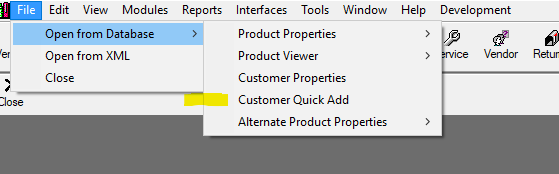
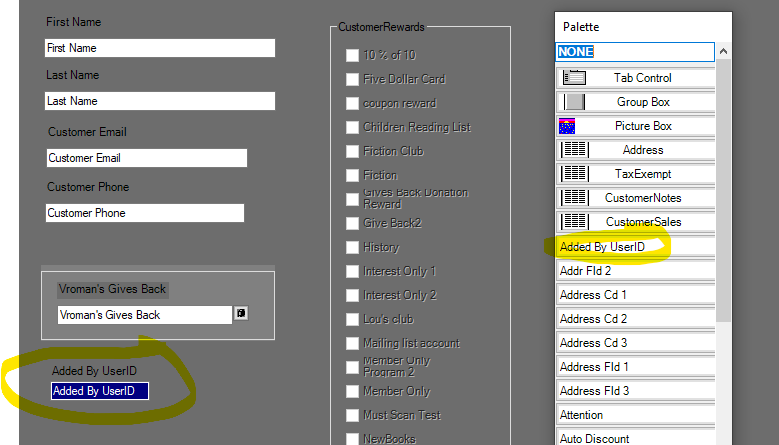
- New option to allow you to customize and design your own **Customer Quick Add form**.
- Go to **Tools** \> **Administration** \> **Screen Designers** - Then click the first option for **Screen Designers. **
- New field option to drag the **Customer Rewards** onto the form with checkboxes for allowing the user to select multiple rewards.
- New field option to show the UserID of who Added the Customer. (**Added By UserID**)
**System Options**
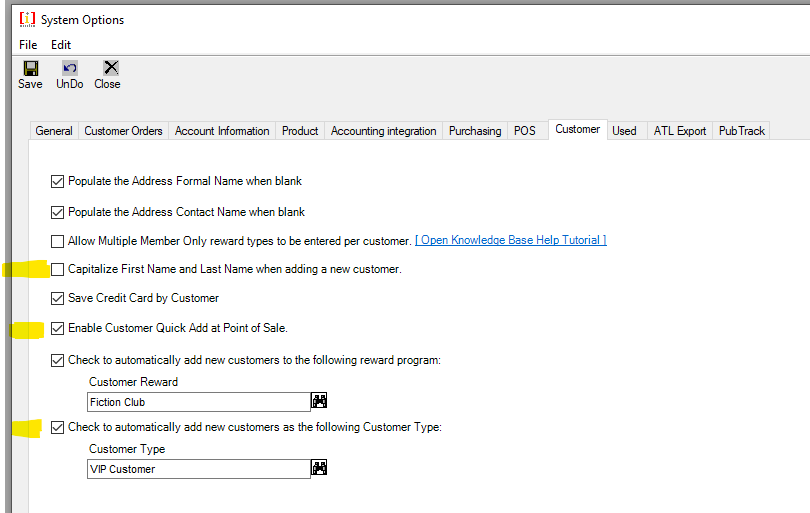
- New system option allowing you to **Capitalize the first and last names** of the customer when using the Quick Add Customer form at POS.
- New option allowing you to **enable or disable the showing of the Quick Add Button at Point of Sale**.
- Another option added was to automatically **add customers as a certain type (Customer Type)** when using the Quick Add Customer option at POS.
**Tender Accounts**
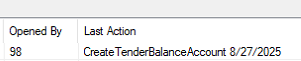
- Includes new columns for Opened By and also Last Action which will show what was the last action done with the tender account
- [FAQs](https://help.imrchnt.com/faqs?hsLang=en#main-content)
- [Reports](https://help.imrchnt.com/faqs?hsLang=en#reports)
- [App](https://help.imrchnt.com/faqs?hsLang=en#app)
- [Getting started](https://help.imrchnt.com/getting-started?hsLang=en#main-content)
- [Store](https://help.imrchnt.com/getting-started?hsLang=en#store)
- [Card Processing](https://help.imrchnt.com/getting-started?hsLang=en#card-processing)
- [Imports](https://help.imrchnt.com/getting-started?hsLang=en#imports)
- [Exports](https://help.imrchnt.com/getting-started?hsLang=en#exports)
- [Troubleshooting](https://help.imrchnt.com/troubleshooting?hsLang=en#main-content)
- [Card Reader](https://help.imrchnt.com/troubleshooting?hsLang=en#card-reader)
- [Web App](https://help.imrchnt.com/troubleshooting?hsLang=en#web-app)
- [General](https://help.imrchnt.com/general?hsLang=en#main-content)
- [Users](https://help.imrchnt.com/general?hsLang=en#users)
- [Point of Sale](https://help.imrchnt.com/general?hsLang=en#point-of-sale)
- [Release Notes](https://help.imrchnt.com/general?hsLang=en#release-notes)
- [Legacy imrchnt](https://help.imrchnt.com/legacy-imrchnt?hsLang=en#main-content)
- [Releases](https://help.imrchnt.com/legacy-imrchnt?hsLang=en#releases)
- [Labels](https://help.imrchnt.com/legacy-imrchnt?hsLang=en#labels)
- [Gift Cards](https://help.imrchnt.com/legacy-imrchnt?hsLang=en#gift-cards)
- [Imports](https://help.imrchnt.com/legacy-imrchnt?hsLang=en#imports)
- [Credit Cards](https://help.imrchnt.com/legacy-imrchnt?hsLang=en#credit-cards)
- [Properties](https://help.imrchnt.com/legacy-imrchnt?hsLang=en#properties)
- [Internal](https://help.imrchnt.com/internal?hsLang=en#main-content)
- [AWS](https://help.imrchnt.com/internal?hsLang=en#aws)
- [iOS](https://help.imrchnt.com/internal?hsLang=en#ios)
- [Card Readers](https://help.imrchnt.com/card-readers?hsLang=en#main-content)
- [Tips](https://help.imrchnt.com/card-readers?hsLang=en#tips)
- [Maintenance](https://help.imrchnt.com/card-readers?hsLang=en#maintenance)
- [Newsletter](https://help.imrchnt.com/newsletter?hsLang=en#main-content)
- [2025](https://help.imrchnt.com/newsletter?hsLang=en#2025)
- [2026](https://help.imrchnt.com/newsletter?hsLang=en#2026)
- [Demo](https://help.imrchnt.com/demo?hsLang=en#main-content)
- [Card Reader](https://help.imrchnt.com/demo?hsLang=en#card-reader)
- [Releases](https://help.imrchnt.com/releases?hsLang=en)
[](https://help.imrchnt.com/?hsLang=en)
[mailto:email@email.com](mailto:email@email.com)
Copyright © 2026, Computac LLC