---
title: Discounting a Special Order after taking a Special-Order Deposit
description: imrchnt knowledge base
---
[Skip to content](https://help.imrchnt.com/s/17626/a/1336927-discounting-a-special-order-after-taking-a-special-order-deposit#main-content)
English
Show submenu for translations

Open main navigation
Close main navigation
- English
Show submenu for translations
- Contact us
Contact us
How can we help you?
- There are no suggestions because the search field is empty.
1. [imrchnt knowledge base](https://help.imrchnt.com/?hsLang=en)
2. [Legacy imrchnt](https://help.imrchnt.com/legacy-imrchnt?hsLang=en)
# Discounting a Special Order after taking a Special-Order Deposit
Problem:
You have taken Special Order Deposits for a book being released soon.
For the first few dozen orders, the deposit was based the on the full cover price of the book. After that, you decided to discount the book.
You now want to sell the full price orders at the discounted price and refund the surplus portion of the deposit to the customer.
How do we do that at the POS?
Solution:
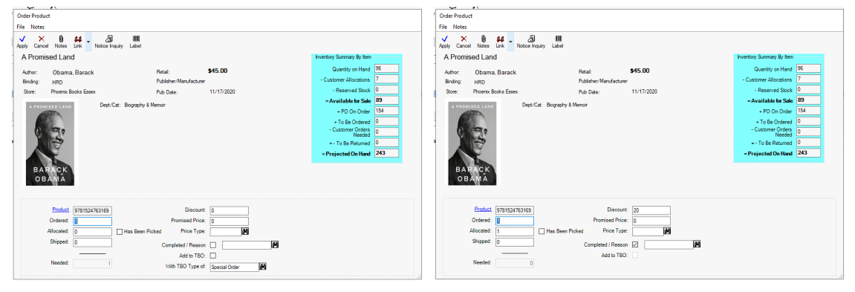
First, update the customer orders so it reflects the discount now, rather than remembering to do it in POS.
[](https://media.screensteps.com/image_assets/assets/003/933/247/original/specialorderdeposits.PNG)
Second, modify the tender to allow payouts as described below.
You will need to ensure your Special-Order Deposit tender will allow for payouts. Below is an example of the deposit tender (Tools \> Parameters \> Tenders \> Properties).
In this example on the balance tab, the Maximum Payout allowed field has a value so POS will ask the cashier if they want to refund the balance when it is below this amount.
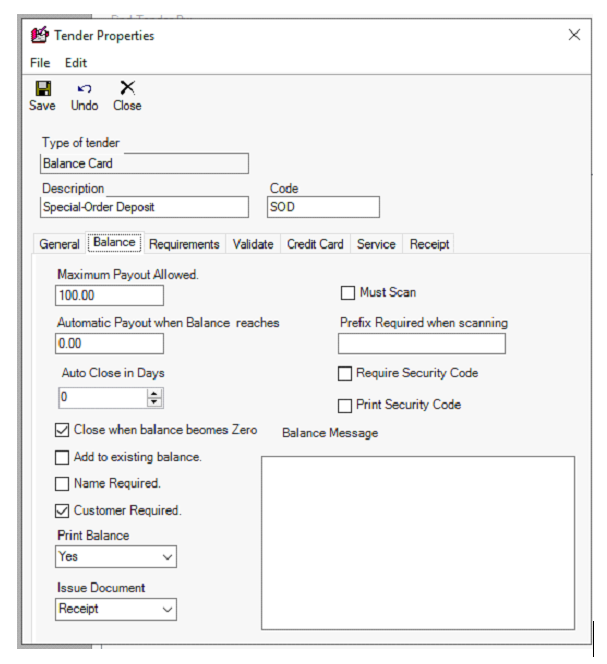
⦁ If the Automatic Payout amount is entered and the amount is under that threshold, the payout will happen without a prompt.
⦁ If the Maximum Payout allowed field is set to zero, no payout is allowed, the customer must use the remaining balance. This is messy, and not automatic.
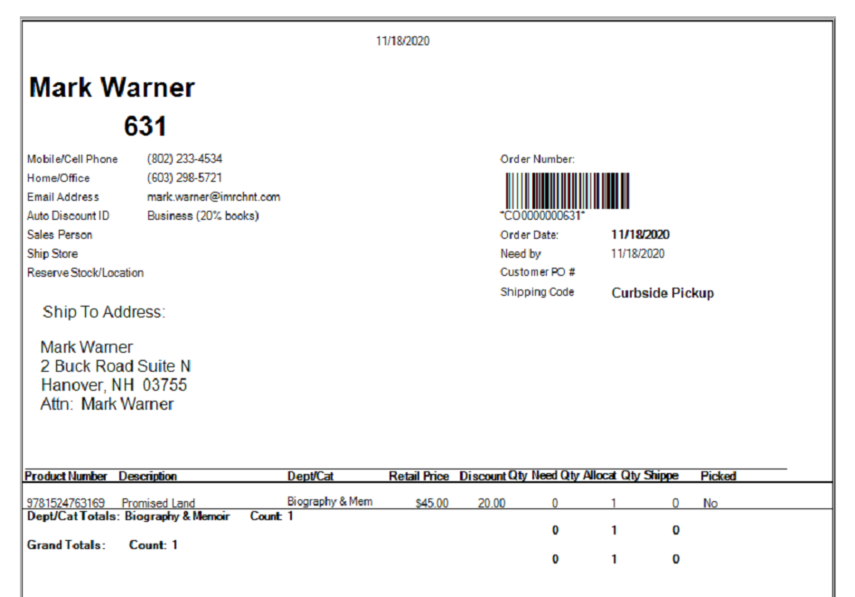
\*The best solution under this scenario is to sell a new gift card for the remaining balance and use the customer order deposit as the tender. (The cashier will need to calculate the remaining amount.)
[](https://media.screensteps.com/image_assets/assets/003/933/249/original/specialorderdeposits3.PNG)
## How to refund a customer's special order deposit in iM
***This procedure is to be done by managers only!***
Steps to Complete:
1. Allocate one copy of **(THE ORIGINAL BOOK USED FOR DEPOSIT)**to the order.
2. Next, sell the remaining title, (BOOK USED FOR DEPOSIT), using the last of the Special-Order Deposit.
3. Next, refund the title to ‘Website Refund’.
4. Lastly, do the refund on your web credit card system.
This completes the Special Order and the Special-Order Deposit.
The sale and subsequent refund of a product you do not have onhand negate each other.
The return to the website refund tender keeps you tenders clear and in balance and provides for the paper trail to back up your refund on the web credit card refund.
- [FAQs](https://help.imrchnt.com/faqs?hsLang=en#main-content)
- [Reports](https://help.imrchnt.com/faqs?hsLang=en#reports)
- [App](https://help.imrchnt.com/faqs?hsLang=en#app)
- [Getting started](https://help.imrchnt.com/getting-started?hsLang=en#main-content)
- [Store](https://help.imrchnt.com/getting-started?hsLang=en#store)
- [Card Processing](https://help.imrchnt.com/getting-started?hsLang=en#card-processing)
- [Imports](https://help.imrchnt.com/getting-started?hsLang=en#imports)
- [Exports](https://help.imrchnt.com/getting-started?hsLang=en#exports)
- [Troubleshooting](https://help.imrchnt.com/troubleshooting?hsLang=en#main-content)
- [Card Reader](https://help.imrchnt.com/troubleshooting?hsLang=en#card-reader)
- [Web App](https://help.imrchnt.com/troubleshooting?hsLang=en#web-app)
- [General](https://help.imrchnt.com/general?hsLang=en#main-content)
- [Users](https://help.imrchnt.com/general?hsLang=en#users)
- [Point of Sale](https://help.imrchnt.com/general?hsLang=en#point-of-sale)
- [Release Notes](https://help.imrchnt.com/general?hsLang=en#release-notes)
- [Legacy imrchnt](https://help.imrchnt.com/legacy-imrchnt?hsLang=en#main-content)
- [Releases](https://help.imrchnt.com/legacy-imrchnt?hsLang=en#releases)
- [Labels](https://help.imrchnt.com/legacy-imrchnt?hsLang=en#labels)
- [Gift Cards](https://help.imrchnt.com/legacy-imrchnt?hsLang=en#gift-cards)
- [Imports](https://help.imrchnt.com/legacy-imrchnt?hsLang=en#imports)
- [Credit Cards](https://help.imrchnt.com/legacy-imrchnt?hsLang=en#credit-cards)
- [Properties](https://help.imrchnt.com/legacy-imrchnt?hsLang=en#properties)
- [Internal](https://help.imrchnt.com/internal?hsLang=en#main-content)
- [AWS](https://help.imrchnt.com/internal?hsLang=en#aws)
- [iOS](https://help.imrchnt.com/internal?hsLang=en#ios)
- [Card Readers](https://help.imrchnt.com/card-readers?hsLang=en#main-content)
- [Tips](https://help.imrchnt.com/card-readers?hsLang=en#tips)
- [Maintenance](https://help.imrchnt.com/card-readers?hsLang=en#maintenance)
- [Newsletter](https://help.imrchnt.com/newsletter?hsLang=en#main-content)
- [2025](https://help.imrchnt.com/newsletter?hsLang=en#2025)
- [2026](https://help.imrchnt.com/newsletter?hsLang=en#2026)
- [Demo](https://help.imrchnt.com/demo?hsLang=en#main-content)
- [Card Reader](https://help.imrchnt.com/demo?hsLang=en#card-reader)
- [Releases](https://help.imrchnt.com/releases?hsLang=en)
[](https://help.imrchnt.com/?hsLang=en)
[mailto:email@email.com](mailto:email@email.com)
Copyright © 2026, Computac LLC