---
title: Download Web Order Files from WordPress Website
description: imrchnt knowledge base
---
[Skip to content](https://help.imrchnt.com/s/17626/a/1291841-download-web-order-files-from-wordpress-website#main-content)
English
Show submenu for translations

Open main navigation
Close main navigation
- English
Show submenu for translations
- Contact us
Contact us
How can we help you?
- There are no suggestions because the search field is empty.
1. [imrchnt knowledge base](https://help.imrchnt.com/?hsLang=en)
2. [Legacy imrchnt](https://help.imrchnt.com/legacy-imrchnt?hsLang=en)
# Download Web Order Files from WordPress Website
Log in to your WP Admin Panel and go to your Plug-ins section.
Add a new plugin called "**Advanced Order Export For WooCommerce**"
The plugin will allow iMerchant to connect to your website and download a file with website orders.
To create an exported file, you may need to purchase the full version for $25, one time fee.
[https://algolplus.com/plugins/downloads/advanced-order-export-for-woocommerce-pro/](https://algolplus.com/plugins/downloads/advanced-order-export-for-woocommerce-pro/)
\*\* You can try and find a free version that lets you download order file also, **call IM to setup.**
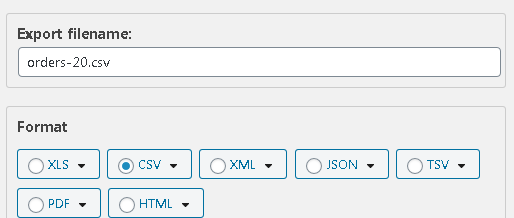
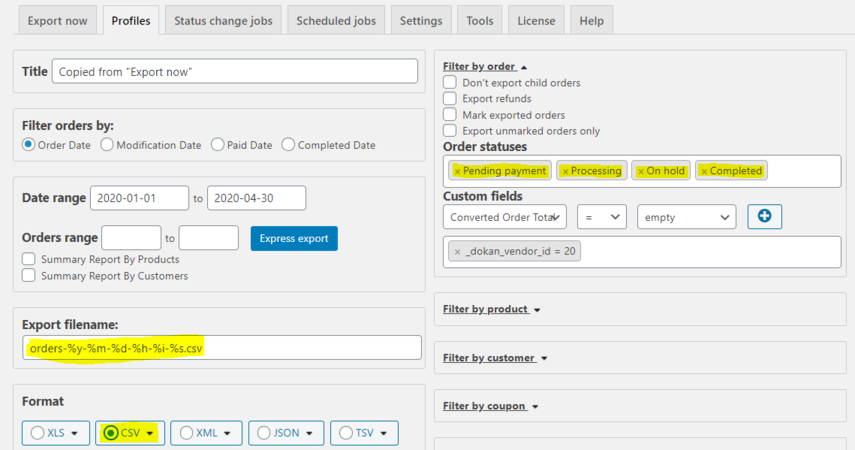
Setup to create a csv file. Make the file name:
YOURBOOKMRKTVENDORID = Bookmrkt.com Vendor ID#
## orders-YOURBOOKMRKTVENDORID.csv
**Setup the following columns to export**
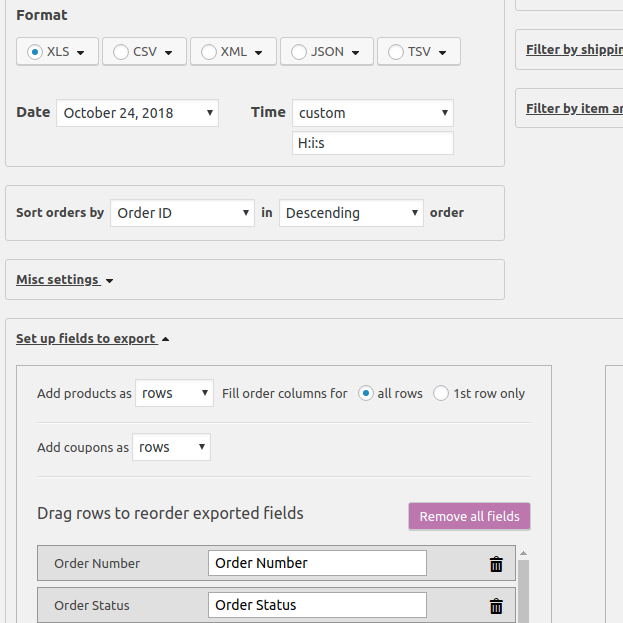
**Order ID,
Email,
Billing First Name,
Billing Last Name,
Billing Company,
Billing Street Address,
Billing Street Address 2,
Billing City,
State/Province code,
Billing Postal Code,
Billing Phone,
Shipping First Name,
Shipping Last Name,
Shipping Company,
Shipping Street Address,
Shipping Street Address 2,
Shipping City,
Shipping State,
Shipping Postal Code,
Shipping Phone,
Shipping Amount",
Shipping Title",
Tax Amount,
Tax Title,
Payment method,
Order total,
Last modified,
Order status,
Comment,
Line Item Price,
Line Item Quantity,
SKU,
Product,
Weight,
Weight units,
Order Date'**
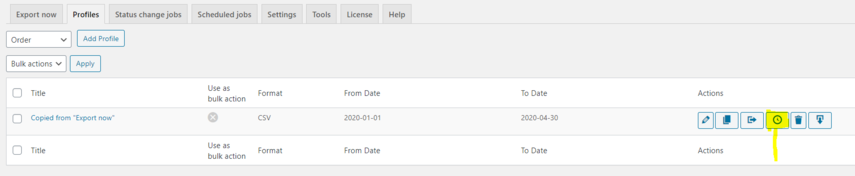
If you created a PROFILE, use the copy to schedule jobs button on the profile tab page to copy your saved settings into a new job.
[](https://media.screensteps.com/image_assets/assets/003/972/193/original/woocommerce-export-profile5.PNG)
## Schedule Job Setup
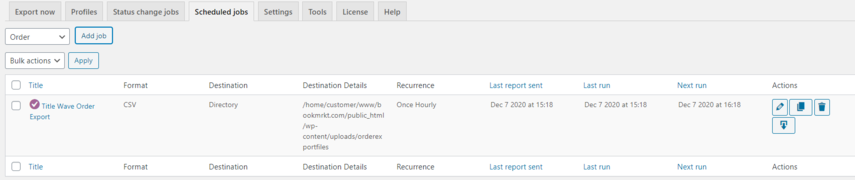
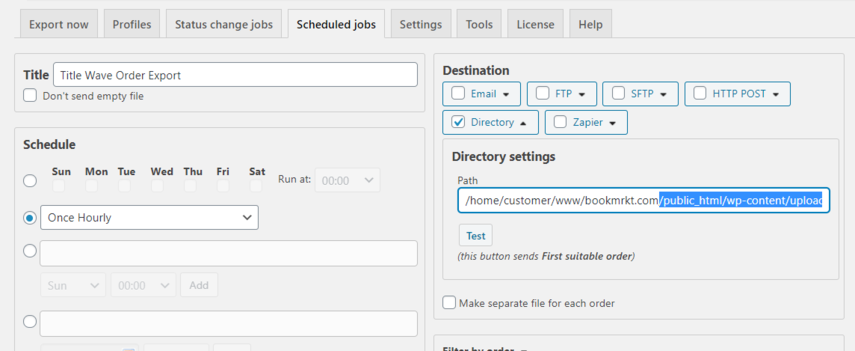
Use the Schedule Jobs tabs to schedule the export to the following folder to automatically create a website order export file on an automatic schedule for IMERCHANT to download and process.
**Use the following settings:**
[](https://media.screensteps.com/image_assets/assets/003/972/179/original/woocommerce-export-profile3.PNG)
Confirm you are exporting to the following website path: /public\_html/wp-content/uploads/orderexportfiles
Verify your file name is the following, lastly confirm you are exporting a CSV.
[](https://media.screensteps.com/image_assets/assets/003/972/178/original/woocommerce-export-profile2.PNG)
[](https://media.screensteps.com/image_assets/assets/003/972/183/original/woocommerce-export-profile4.PNG)
- [FAQs](https://help.imrchnt.com/faqs?hsLang=en#main-content)
- [Reports](https://help.imrchnt.com/faqs?hsLang=en#reports)
- [App](https://help.imrchnt.com/faqs?hsLang=en#app)
- [Getting started](https://help.imrchnt.com/getting-started?hsLang=en#main-content)
- [Store](https://help.imrchnt.com/getting-started?hsLang=en#store)
- [Card Processing](https://help.imrchnt.com/getting-started?hsLang=en#card-processing)
- [Imports](https://help.imrchnt.com/getting-started?hsLang=en#imports)
- [Exports](https://help.imrchnt.com/getting-started?hsLang=en#exports)
- [Troubleshooting](https://help.imrchnt.com/troubleshooting?hsLang=en#main-content)
- [Card Reader](https://help.imrchnt.com/troubleshooting?hsLang=en#card-reader)
- [Web App](https://help.imrchnt.com/troubleshooting?hsLang=en#web-app)
- [General](https://help.imrchnt.com/general?hsLang=en#main-content)
- [Users](https://help.imrchnt.com/general?hsLang=en#users)
- [Point of Sale](https://help.imrchnt.com/general?hsLang=en#point-of-sale)
- [Release Notes](https://help.imrchnt.com/general?hsLang=en#release-notes)
- [Legacy imrchnt](https://help.imrchnt.com/legacy-imrchnt?hsLang=en#main-content)
- [Releases](https://help.imrchnt.com/legacy-imrchnt?hsLang=en#releases)
- [Labels](https://help.imrchnt.com/legacy-imrchnt?hsLang=en#labels)
- [Gift Cards](https://help.imrchnt.com/legacy-imrchnt?hsLang=en#gift-cards)
- [Imports](https://help.imrchnt.com/legacy-imrchnt?hsLang=en#imports)
- [Credit Cards](https://help.imrchnt.com/legacy-imrchnt?hsLang=en#credit-cards)
- [Properties](https://help.imrchnt.com/legacy-imrchnt?hsLang=en#properties)
- [Internal](https://help.imrchnt.com/internal?hsLang=en#main-content)
- [AWS](https://help.imrchnt.com/internal?hsLang=en#aws)
- [iOS](https://help.imrchnt.com/internal?hsLang=en#ios)
- [Card Readers](https://help.imrchnt.com/card-readers?hsLang=en#main-content)
- [Tips](https://help.imrchnt.com/card-readers?hsLang=en#tips)
- [Maintenance](https://help.imrchnt.com/card-readers?hsLang=en#maintenance)
- [Newsletter](https://help.imrchnt.com/newsletter?hsLang=en#main-content)
- [2025](https://help.imrchnt.com/newsletter?hsLang=en#2025)
- [2026](https://help.imrchnt.com/newsletter?hsLang=en#2026)
- [Demo](https://help.imrchnt.com/demo?hsLang=en#main-content)
- [Card Reader](https://help.imrchnt.com/demo?hsLang=en#card-reader)
- [Releases](https://help.imrchnt.com/releases?hsLang=en)
[](https://help.imrchnt.com/?hsLang=en)
[mailto:email@email.com](mailto:email@email.com)
Copyright © 2026, Computac LLC