---
title: Email Themes for Receipts & Customer Notification
description: imrchnt knowledge base
---
[Skip to content](https://help.imrchnt.com/s/17626/a/1142898-email-themes-for-receipts-customer-notification#main-content)
English
Show submenu for translations

Open main navigation
Close main navigation
- English
Show submenu for translations
- Contact us
Contact us
How can we help you?
- There are no suggestions because the search field is empty.
1. [imrchnt knowledge base](https://help.imrchnt.com/?hsLang=en)
2. [Legacy imrchnt](https://help.imrchnt.com/legacy-imrchnt?hsLang=en)
# Email Themes for Receipts & Customer Notification
## Email Themes for Receipts & Customer Notification
The Email Theme Parameter allows you to create multiple email template for each of your stores for sending alerts from IMRCHNT in customer notifications, point of sale (POS) receipts and also statements / reports.
Use your company logos, combined with product photos to create eye catching emails for your customers.
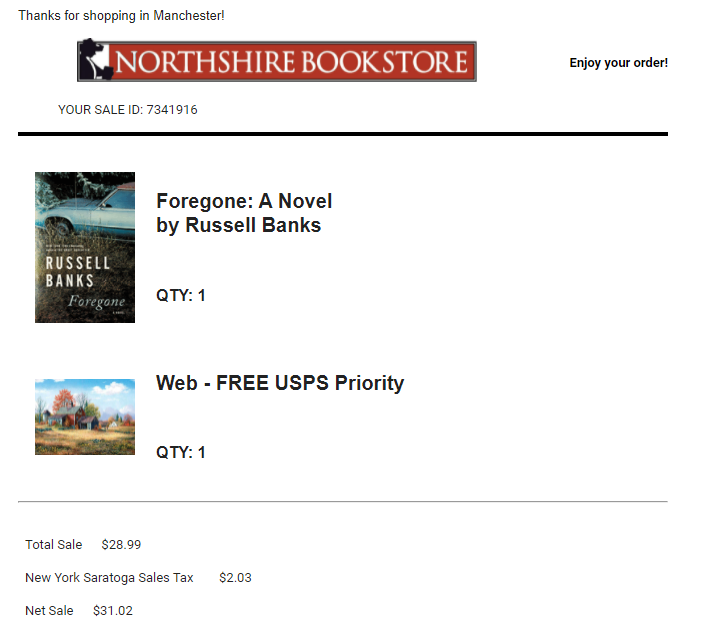
## Designer Screen for Email Themes
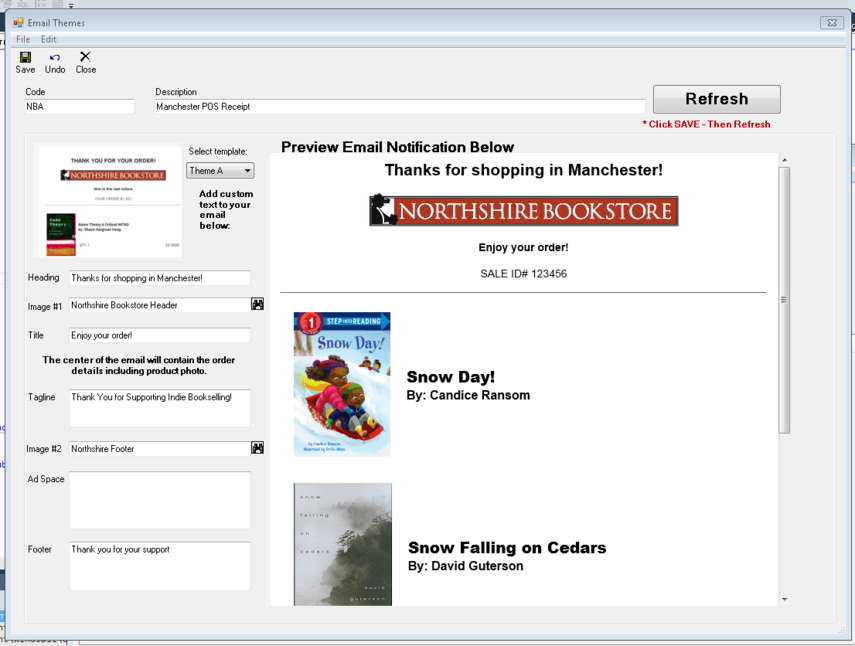
GO TO: **TOOLS **\> **PARAMETERS **\> **EMAIL THEMES**
You can create any number of email themes
[](https://media.screensteps.com/image_assets/assets/004/449/467/original/emailtheme-designer.PNG)
\- Select from 6 different email templates
\- Heading, Title, Tagline, Ad Space and Footer boxes can be filled with any number of different text values.
HTML TAGS:
---
\- Image #1 & #2 are Image Parameters
## Email Theme By Store
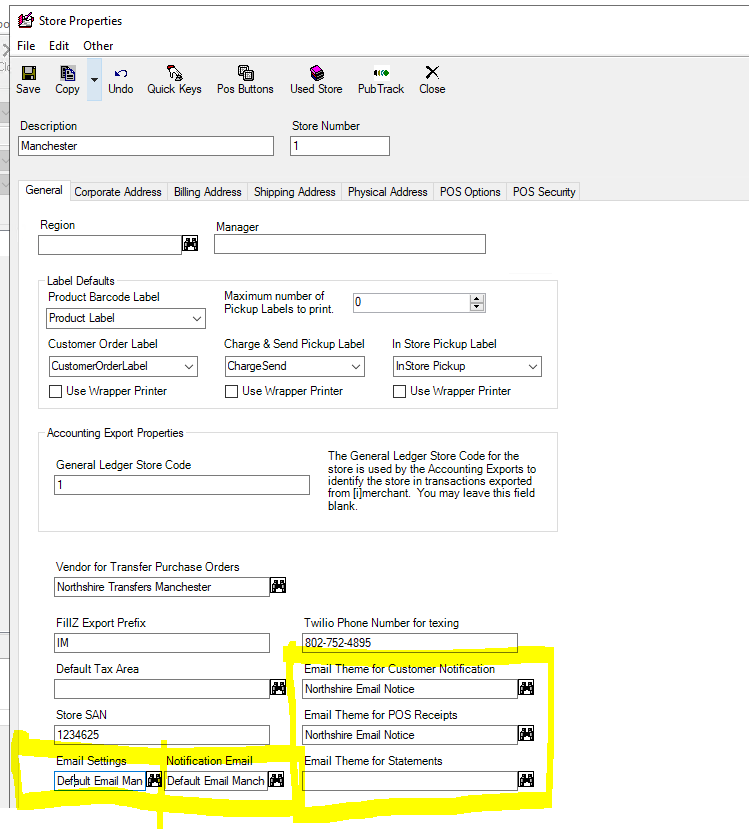
Each store can have their own email theme with separate logo and details about that specific store. You can can setup different email themes for each type of email sent from IMRCHNT with separate themes for Point of Sale (POS) Receipts, Customer Notification Alerts & Follow Ups and Reports / Statements.
To **Pick Email Themes By Store**, Go To: **Tools **\> **Parameters **\> **Store Number**
## Enable Email Settings in IMRCHNT
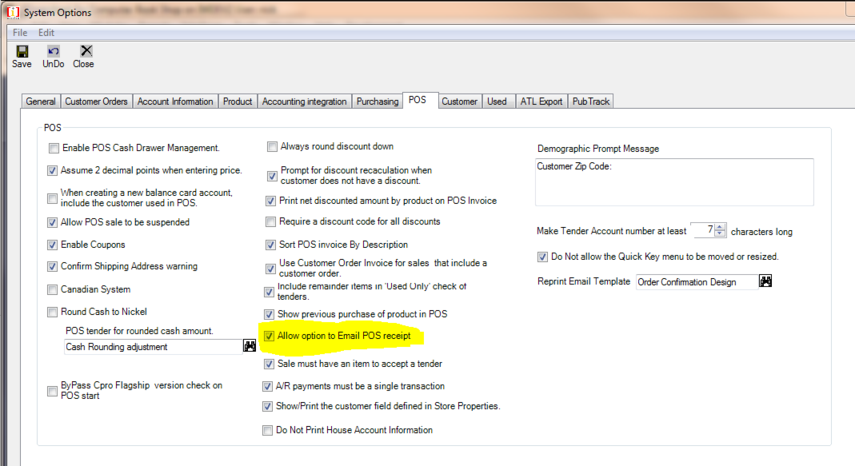
To enable emailing from IMRCNHT it requires the following checkbox checked,
Go to: TOOLS / OPTIONS then click on the POS Tab.
[](https://media.screensteps.com/image_assets/assets/003/005/083/original/checkboxtoturnonemailreceipt.PNG)
Also requires you to setup your PC printing settings since the email function is tied into the reprint option for your POS receipts. Confirm you have POS Printer and POS Receipt Printers setup and you have a printer highlighted below.
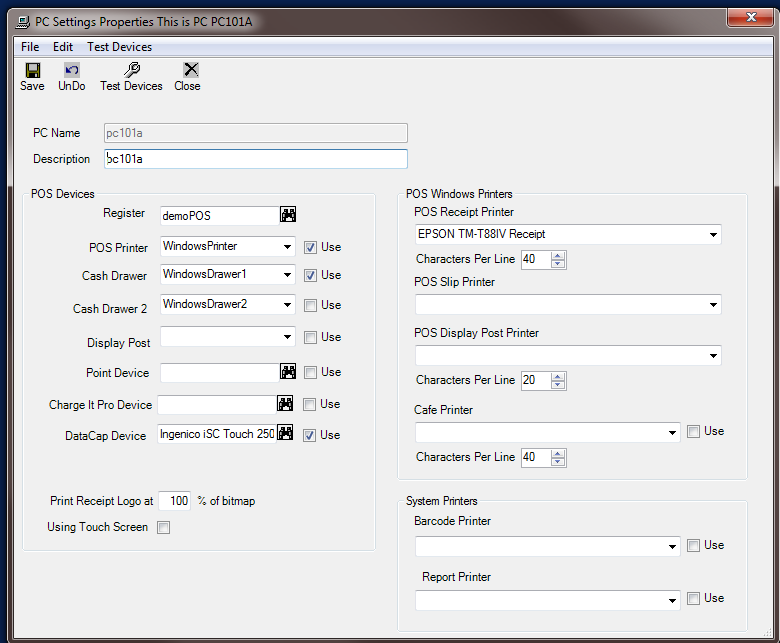
**NOTE**: **If you are having any trouble with the email themes, you can clear out the theme values and IMRCHNT will only send plain text email alerts. **
- [FAQs](https://help.imrchnt.com/faqs?hsLang=en#main-content)
- [Reports](https://help.imrchnt.com/faqs?hsLang=en#reports)
- [App](https://help.imrchnt.com/faqs?hsLang=en#app)
- [Getting started](https://help.imrchnt.com/getting-started?hsLang=en#main-content)
- [Store](https://help.imrchnt.com/getting-started?hsLang=en#store)
- [Card Processing](https://help.imrchnt.com/getting-started?hsLang=en#card-processing)
- [Imports](https://help.imrchnt.com/getting-started?hsLang=en#imports)
- [Exports](https://help.imrchnt.com/getting-started?hsLang=en#exports)
- [Troubleshooting](https://help.imrchnt.com/troubleshooting?hsLang=en#main-content)
- [Card Reader](https://help.imrchnt.com/troubleshooting?hsLang=en#card-reader)
- [Web App](https://help.imrchnt.com/troubleshooting?hsLang=en#web-app)
- [General](https://help.imrchnt.com/general?hsLang=en#main-content)
- [Users](https://help.imrchnt.com/general?hsLang=en#users)
- [Point of Sale](https://help.imrchnt.com/general?hsLang=en#point-of-sale)
- [Release Notes](https://help.imrchnt.com/general?hsLang=en#release-notes)
- [Legacy imrchnt](https://help.imrchnt.com/legacy-imrchnt?hsLang=en#main-content)
- [Releases](https://help.imrchnt.com/legacy-imrchnt?hsLang=en#releases)
- [Labels](https://help.imrchnt.com/legacy-imrchnt?hsLang=en#labels)
- [Gift Cards](https://help.imrchnt.com/legacy-imrchnt?hsLang=en#gift-cards)
- [Imports](https://help.imrchnt.com/legacy-imrchnt?hsLang=en#imports)
- [Credit Cards](https://help.imrchnt.com/legacy-imrchnt?hsLang=en#credit-cards)
- [Properties](https://help.imrchnt.com/legacy-imrchnt?hsLang=en#properties)
- [Internal](https://help.imrchnt.com/internal?hsLang=en#main-content)
- [AWS](https://help.imrchnt.com/internal?hsLang=en#aws)
- [iOS](https://help.imrchnt.com/internal?hsLang=en#ios)
- [Card Readers](https://help.imrchnt.com/card-readers?hsLang=en#main-content)
- [Tips](https://help.imrchnt.com/card-readers?hsLang=en#tips)
- [Maintenance](https://help.imrchnt.com/card-readers?hsLang=en#maintenance)
- [Newsletter](https://help.imrchnt.com/newsletter?hsLang=en#main-content)
- [2025](https://help.imrchnt.com/newsletter?hsLang=en#2025)
- [2026](https://help.imrchnt.com/newsletter?hsLang=en#2026)
- [Demo](https://help.imrchnt.com/demo?hsLang=en#main-content)
- [Card Reader](https://help.imrchnt.com/demo?hsLang=en#card-reader)
- [Releases](https://help.imrchnt.com/releases?hsLang=en)
[](https://help.imrchnt.com/?hsLang=en)
[mailto:email@email.com](mailto:email@email.com)
Copyright © 2026, Computac LLC