---
title: 3rd Party Downloads for IMERCHANT
description: imrchnt knowledge base
---
[Skip to content](https://help.imrchnt.com/s/17626/a/1066980-3rd-party-downloads-for-imerchant#main-content)
English
Show submenu for translations

Open main navigation
Close main navigation
- English
Show submenu for translations
- Contact us
Contact us
How can we help you?
- There are no suggestions because the search field is empty.
1. [imrchnt knowledge base](https://help.imrchnt.com/?hsLang=en)
2. [Legacy imrchnt](https://help.imrchnt.com/legacy-imrchnt?hsLang=en)
# 3rd Party Downloads for IMERCHANT
## ConnectWise , microsoft uninstall tool
## ConnectWise
[**DOWNLOAD CONNECTWISE TO YOUR LOCAL COMPUTER**](https://imsupport.screenconnect.com/Bin/ConnectWiseControl.ClientSetup.exe?h=instance-hc7bja-relay.screenconnect.com&p=443&k=BgIAAACkAABSU0ExAAgAAAEAAQAxX%2FFtILRfgTkkUfw74EcAv0xpJXXT%2BHg70iawMN3fZaqWWlNHZYNPswcbyCKx2%2BJMEbnN7tfnUYoiirN4rQWaiNmWSYlC%2Fu8BsstUghFk0AJeaLsmTYhdis1r%2BDcl4jB7jbDjKMs9uKjdHRa9v2oZodSiqtOrrod10jJmkm4%2F%2BgbeNyHH4%2FFGAl1hLucoGLONuRxOY52cRsMf6Gr5v3aCO%2BnQRzhu2XWXnuWSLDXvf9hwkZ0g40lNy2a3RLZUE9fjzN5%2BSijugBbiKMt2CkGemTCq0Ubiub44OmbZYOnVrKy5ZeT1lPr4dyOVQjr5Ro%2FlU3ykThBltP6R91o6qy7H&e=Access&y=Guest&t=New%20PC&c=New%20Site&c=&c=&c=&c=&c=&c=&c=)
By clicking on the download link above, you will be putting ConnectWise on to your PC and we will be able to access that PC remotely.
If the link above doesn't work when clicked, copy the following url:
https://imsupport.screenconnect.com/Bin/ConnectWiseControl.ClientSetup.exe?h=instance-hc7bja-relay.screenconnect.com&p=443&k=BgIAAACkAABSU0ExAAgAAAEAAQAxX%2FFtILRfgTkkUfw74EcAv0xpJXXT%2BHg70iawMN3fZaqWWlNHZYNPswcbyCKx2%2BJMEbnN7tfnUYoiirN4rQWaiNmWSYlC%2Fu8BsstUghFk0AJeaLsmTYhdis1r%2BDcl4jB7jbDjKMs9uKjdHRa9v2oZodSiqtOrrod10jJmkm4%2F%2BgbeNyHH4%2FFGAl1hLucoGLONuRxOY52cRsMf6Gr5v3aCO%2BnQRzhu2XWXnuWSLDXvf9hwkZ0g40lNy2a3RLZUE9fjzN5%2BSijugBbiKMt2CkGemTCq0Ubiub44OmbZYOnVrKy5ZeT1lPr4dyOVQjr5Ro%2FlU3ykThBltP6R91o6qy7H&e=Access&y=Guest&t=New%20PC&c=New%20Site&c=&c=&c=&c=&c=&c=&c=
**Having Trouble?**
If you have trouble uninstalling an older version of the software, try using the Microsoft Uninstall / Install Program Fixer
[https://support.microsoft.com/en-us/help/17588/windows-fix-problems-that-block-programs-being-installed-or-removed](https://support.microsoft.com/en-us/help/17588/windows-fix-problems-that-block-programs-being-installed-or-removed)
## Install Google Drive as Local Folder / Drive
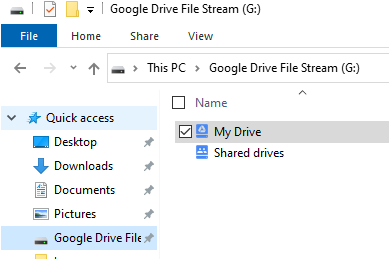
Use the link below to download and install onto your Windows PC or MAC. [**DOWNLOAD GOOGLE DRIVE**](https://support.google.com/a/answer/7491144?utm_medium=et&utm_source=aboutdrive&utm_content=getstarted&utm_campaign=en_us&hl=en#zippy=%2Cwindows)
[https://support.google.com/a/answer/7491144?utm\_medium=et&utm\_source=aboutdrive&utm\_content=getstarted&utm\_campaign=en\_us&hl=en#zippy=%2Cwindows](https://support.google.com/a/answer/7491144?utm_medium=et&utm_source=aboutdrive&utm_content=getstarted&utm_campaign=en_us&hl=en#zippy=%2Cwindows)
## Virus Protection FAQs
Avast virus protection requirements include:
**Known exceptions so far**
- iMRCHNT folders
- SQL Server folders
- ThinPrint folders
**Current exceptions applied at Customers Systems Include**
- C:\\SQLServer2017Media
- C:\\Program Files\\Microsoft SQL Server\\\*
- C:\\ProgramData\\Microsoft\\Windows\\Start Menu\\Programs\\Computac Inc\\\[i\]merchant\\\*
- C:\\Program Files (x86)\\Computac Inc\\\*
- C:\\Computac\\
Please review and let me know if there are **any additional paths or executables** we should include.
**Avast** is an antivirus and endpoint security program. It started as a free consumer antivirus back in the late 1980s in what was then Czechoslovakia, and it grew into one of the most widely installed security suites on Windows PCs.
**What it does:**
- **Scans for malware:** Viruses, ransomware, spyware, trojans, and other nasties.
- **Shields in real time:** It monitors files, downloads, and running processes for anything suspicious.
- **Web protection:** Blocks malicious websites or downloads.
- **Firewall / sandbox (paid editions):** Adds extra controls for network traffic and isolating apps.
- **System cleanup tools:** Some versions include “performance” and “update” utilities, which try to manage startup apps, clean junk, or even block “untrusted” tasks.
**Why it can be a pain in IT setups like yours:**
Avast is aggressive. It doesn’t just block what it *thinks* is malware—it sometimes quarantines or deletes legitimate business apps, scheduled tasks, and executables. In bookstore/POS environments, this means:
- POS clients or offline sync processes can be deleted.
- SQL Server services or scheduled tasks get blocked.
- Installers for iMRCHNT or ThinPrint can be prevented from running.
That’s why you’ve had to either **turn it off entirely** or add explicit **exceptions** for your iMRCHNT folders, SQL folders, and related components.
- [FAQs](https://help.imrchnt.com/faqs?hsLang=en#main-content)
- [Reports](https://help.imrchnt.com/faqs?hsLang=en#reports)
- [App](https://help.imrchnt.com/faqs?hsLang=en#app)
- [Getting started](https://help.imrchnt.com/getting-started?hsLang=en#main-content)
- [Store](https://help.imrchnt.com/getting-started?hsLang=en#store)
- [Card Processing](https://help.imrchnt.com/getting-started?hsLang=en#card-processing)
- [Imports](https://help.imrchnt.com/getting-started?hsLang=en#imports)
- [Exports](https://help.imrchnt.com/getting-started?hsLang=en#exports)
- [Troubleshooting](https://help.imrchnt.com/troubleshooting?hsLang=en#main-content)
- [Card Reader](https://help.imrchnt.com/troubleshooting?hsLang=en#card-reader)
- [Web App](https://help.imrchnt.com/troubleshooting?hsLang=en#web-app)
- [General](https://help.imrchnt.com/general?hsLang=en#main-content)
- [Users](https://help.imrchnt.com/general?hsLang=en#users)
- [Point of Sale](https://help.imrchnt.com/general?hsLang=en#point-of-sale)
- [Release Notes](https://help.imrchnt.com/general?hsLang=en#release-notes)
- [Legacy imrchnt](https://help.imrchnt.com/legacy-imrchnt?hsLang=en#main-content)
- [Releases](https://help.imrchnt.com/legacy-imrchnt?hsLang=en#releases)
- [Labels](https://help.imrchnt.com/legacy-imrchnt?hsLang=en#labels)
- [Gift Cards](https://help.imrchnt.com/legacy-imrchnt?hsLang=en#gift-cards)
- [Imports](https://help.imrchnt.com/legacy-imrchnt?hsLang=en#imports)
- [Credit Cards](https://help.imrchnt.com/legacy-imrchnt?hsLang=en#credit-cards)
- [Properties](https://help.imrchnt.com/legacy-imrchnt?hsLang=en#properties)
- [Internal](https://help.imrchnt.com/internal?hsLang=en#main-content)
- [AWS](https://help.imrchnt.com/internal?hsLang=en#aws)
- [iOS](https://help.imrchnt.com/internal?hsLang=en#ios)
- [Card Readers](https://help.imrchnt.com/card-readers?hsLang=en#main-content)
- [Tips](https://help.imrchnt.com/card-readers?hsLang=en#tips)
- [Maintenance](https://help.imrchnt.com/card-readers?hsLang=en#maintenance)
- [Newsletter](https://help.imrchnt.com/newsletter?hsLang=en#main-content)
- [2025](https://help.imrchnt.com/newsletter?hsLang=en#2025)
- [2026](https://help.imrchnt.com/newsletter?hsLang=en#2026)
- [Demo](https://help.imrchnt.com/demo?hsLang=en#main-content)
- [Card Reader](https://help.imrchnt.com/demo?hsLang=en#card-reader)
- [Releases](https://help.imrchnt.com/releases?hsLang=en)
[](https://help.imrchnt.com/?hsLang=en)
[mailto:email@email.com](mailto:email@email.com)
Copyright © 2026, Computac LLC