
Most Current Version
Android - 320
Card Reader - 319
iOS - 56
Faster Check Out
We have updated the Payment button to assume that the transaction is going to be paid in whole by a Credit Card.
If the customer prefers to use cash, split the tender, or you need to manual key in the card information the option still exists by clicking on the icon to the left of the payment button.
POS Quick Tags
Within the Search icon on the Mobile and Card Reader apps. Within Quick Buttons you can build the cart then push the items back into the order screen to tender payment.
Quick Buttons are built on a per store basis and can be done through the Admin > Stores > Manage POS Actions. The video below shows all the possibilities in building Quick tags to be presented at POS.
Within POS Actions you can also arrange the buttons how you would like them to be presented on the POS screen
Bulk Actions
Something we were shocked to find poking around a Square store is that they don't have the ability to easily click on all items and apply an action. You can click one by one, but you can't select all on a page, or all results in a query.
im+ is capable of doing bulk actions against items and attributes.
Everyone has bad data, we seek to allow you to more easily clean up your data. If we don't have good data, we can't provide good actionable analytics in the future.
Attribute Merge: Within Products > Attributes the below video shows an example of merging two versions of C.S. Lewis into one.
Product Actions: From the product search you can bulk select items to assign them to attributes, move to stores, assign to accounting categories
Scheduled Imports
We now have the ability to make your legacy imrchnt inventory as near real time as we can get with flat files. Our new import scheduler will allow us to map imports from any source for inventory and customers. For our legacy imrchnt customers we can setup up a scheduled task to run every 15 minutes to send im+ delta files with any changes that took place since the last run. If no changes have taken place the process doesn't run. These files are sent to our SFTP server. Each account has their own sftp folders, we attempt to pickup files every 5 minutes and import them automatically.
This is how the import log looks for Still North
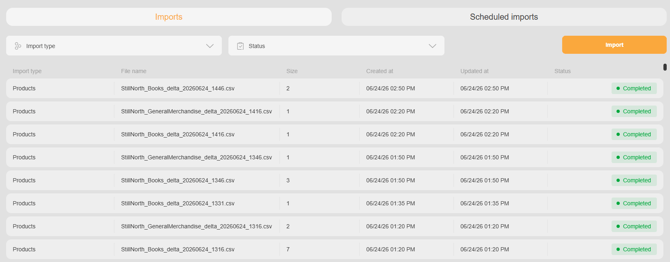
This is how the Scheduled Imports tab looks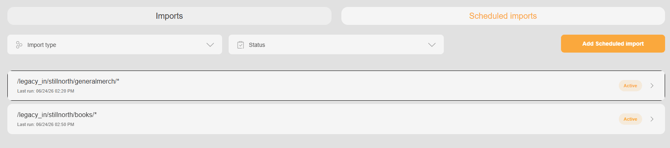
Expanded to show log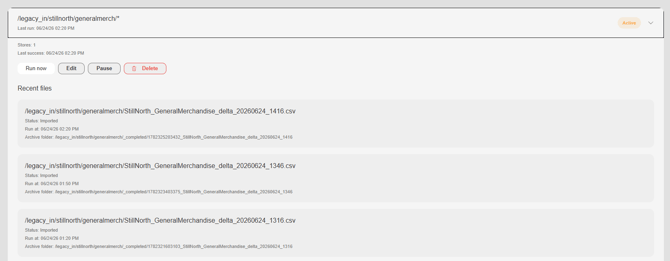
Should you have an automated import that has failed you can Re-import it by click on Actions and select Re-import then following the prompts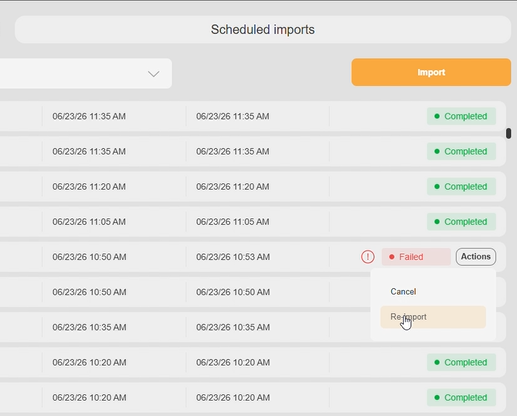
Improved Search
As you may have noticed in some of the videos we have put in a major effort to improve our search capabilities. We have improved not just the speed of the results, but the presentation of the results as well. By offering result hints, you can more quickly move pull up results or move directly into the item you are looking for.
Accounting Categories (Admin > Accounting Category)
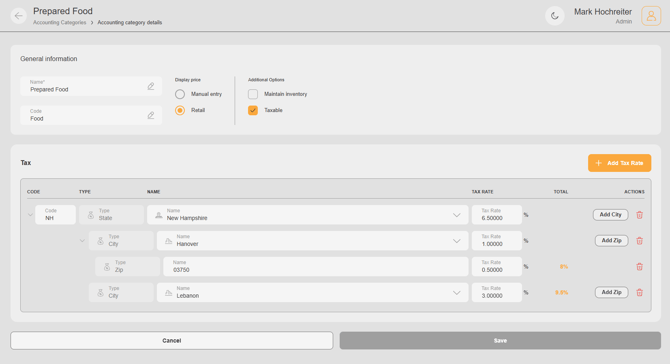
Manual Entry: Checking the dial for Manual Entry under display price will allow you to set certain items in your inventory to be price point items where we will prompt for the price at POS. This could be used books that aren't in inventory or Newspapers or whatever else you'd like to set at a manual entry price point at POS.
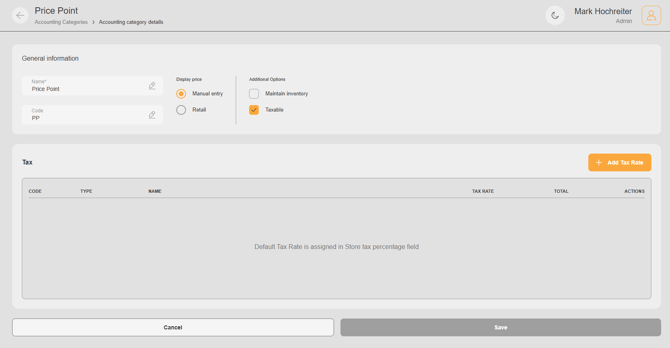
Items assigned to a category as Manual entry will look like this at POS (example shows the item as a POS Quick Tag)
Maintain Inventory: Checking this box will make items assigned to this Accounting Category maintain their inventory levels by default. Having this box unchecked means the items will not maintain any inventory values.
Taxable: Checked = Yes. If no Tax rules are built within Account Category then we will use the store default tax in the Store Properties). If Tax rules are built we will apply that tax rate to items assigned to the Accounting Category. If Items aren't assigned a category they will by default maintain inventory, be taxed at the store rate, and when scanned use the retail price on record.
Build Tax Rules: Our tax builder allows you to build rates all the way down to the zip code level.
If you have any questions or would like for us to help show you around please contact support@imrchnt.com and we will set up a session.